Kids benefit from simple, mess-free drawing tablets that blend creativity with learning. This article reviews five popular LCD writing tablets for children, highlighting size, features, durability, and eye-friendly designs. Use this guide to compare options for classrooms, travel, or at-home learning, helping young artists develop handwriting, spelling, math, and imaginative play without paper waste.
| Product | Size | Key Benefit |
|---|---|---|
| 4 Pack LCD Writing Tablet for Kids | 8.5 inch | Bright, pressure-sensitive drawing with color variety |
| TECJOE LCD Writing Tablet | 8.5 inch | Multi-pack value with eco-friendly, eye-safe display |
| KOKODI LCD Writing Tablet | 10 inch | Large color screen, durable and safe for kids |
| Teriph LCD Writing Tablet | 8.5 inch | Low energy, eye-protective display with sturdy build |
| FLUESTON LCD Writing Tablet | 10 inch | Portable, no glare, easy erase and lock features |
Notes: Each product supports repeated writing and erasing to reduce waste. Look for features like erase buttons, lock/save options, portable design, and eye-friendly LCD technology when choosing the right tablet for a child’s needs.
4 Pack LCD Writing Tablet for Kids

The 4 Pack from TQU delivers a bright, pressure-sensitive LCD writing experience across four colorful boards (Blue, Light Blue, Green, Pink). Each tablet supports drawing, writing, spelling, math, and notes, with an erase button and a lock switch to save content. The included stylus attaches to the top for easy storage, and the screens are designed to be more vivid and clearer than standard LCD boards. This pack is ideal for siblings or classroom activities where multiple boards are needed.
TECJOE LCD Writing Tablet

The TECJOE 2-Pack offers brighter, clearer lines with pressure-sensitive liquid crystal technology and a color-coded display (Blue and Pink). It emphasizes eco-friendliness by enabling up to 20,000 uses per tablet and reduces paper waste, while providing an eye-friendly screen that minimizes glare. Educational potential covers spelling and simple math, making it suitable for preschool and early elementary learning, travel, and quick practice sessions.
KOKODI LCD Writing Tablet
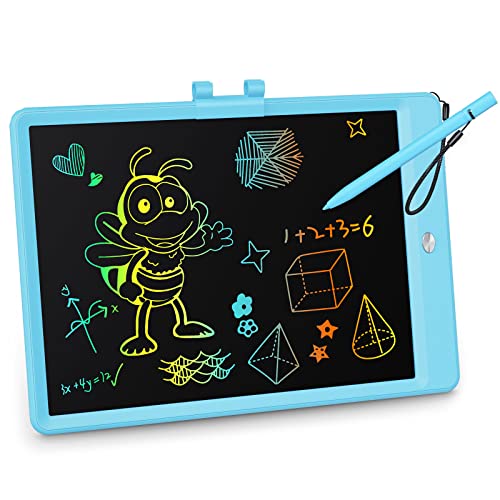
The KOKODI tablet features a 10-inch color screen with a pressure-sensitive LCD, offering vibrant lines for drawing, writing, spelling, and math. It runs on a long-lasting built-in battery with a reported 100,000 writing cycles, reducing waste and avoiding frequent replacements. A safety-conscious design includes a screw-secured battery compartment. The durable construction and larger screen heighten its suitability for kids who want bigger canvases for creative projects and classroom-style tasks.
Teriph LCD Writing Tablet

Teriph emphasizes a low-energy, eye-protective 8.5-inch screen with a safe ABS shell and attached stylus. The tablet supports multiple functions like drawing, doodling, spelling, and notes, while its lock feature helps preserve important content. Its durable build and non-toxic materials suit younger children, and the device is designed to be user-friendly for early literacy and numeracy practice at home or in a classroom corner.
FLUESTON LCD Writing Tablet

FLUESTON offers a 10-inch, color LCD drawing pad designed for portability and ease of use. It includes a writing stylus and emphasizes no blue light, reduced glare, and eye-friendly design. The tablet is marketed as a versatile educational tool suitable for travel, classroom activities, and home practice, with an erase button and a lock feature to prevent accidental deletions. The device balances entertainment with learning tasks such as spelling and basic math.
Buying Guide: Key Purchase Considerations
- Screen size and portability: Choose a size that fits the child’s hands and typical use—smaller sizes are great for travel, larger screens support bigger drawings and more complex tasks.
- Erasing and saving: Look for an accessible erase button and a lock or save function to preserve important work without losing progress.
- Durability and safety: Ensure the shell is sturdy, edges are rounded, and the battery compartment is secure or user-replaceable if needed. Non-toxic materials are preferred for younger children.
- Eye comfort: Prioritize screens with no backlight or minimized glare for prolonged use, reducing fatigue during learning sessions.
- Battery life and replacement: Consider whether the device uses a replaceable battery and the expected lifespan of the battery versus rechargeable options.
- Educational value: Assess whether the tablet supports handwriting practice, spelling, math, and other early learning activities beyond free scribbling.
- Multi-pack value: For families with multiple children or classroom use, multi-pack options can maximize value and convenience while encouraging shared activities.
- Durable stylus design: A snugly attached stylus reduces the chance of losing writing tools and keeps the tablet ready for use.