Discover engaging, beginner-friendly programmable robots for kids that blend coding, problem-solving, and creativity. This guide highlights five standout kits designed to teach Scratch, Python, or general robotics concepts through hands-on play. Each profile includes a quick overview and practical tips to help parents choose the right fit for age, skill level, and interests.
| Product | Brand | Why It’s Great |
|---|---|---|
| Makeblock MBot Kit | Makeblock | Entry-level coding with Scratch and Arduino; quick build; rich tutorials |
| Ruko 1088 Smart Robots | Ruko | Large, interactive robot with voice and app control; diverse functions |
| Henoda Robot Toys | Henoda | 468+ pieces with multiple control modes; strong stem-building focus |
| ELEGOO UNO R3 Smart Robot Car Kit V4 | ELEGOO | Comprehensive Arduino-based kit; obstacle tracing and remote control |
| BAZOLOTA Robot Toys | BAZOLOTA | Gesture sensing, remote control, and 60+ minutes of play with dual control modes |
Makeblock MBot Kit — Learn to Code with Scratch & Arduino

The MBot Kit from Makeblock is positioned as an accessible entry point for kids ages 8-12 to explore electronics, robotics, and programming. It combines Scratch-based coding with Arduino compatibility, allowing young learners to progress from block-based to text-based coding as they grow. Assembly is designed for speed, often taking about 15 minutes, which keeps early milestones rewarding and engaging. Included are learning resources and coding cards, plus software that supports remote control, line-following, and obstacle-avoidance functions. Note: batteries not included for the remote and robot kit.
Ruko 1088 Smart Robots — Large Interactive Robot

The Ruko 1088 is a tall, expressive programmable robot designed as a long-lasting educational companion for kids aged 4 and up. Its height (up to 15.8 inches) makes it a visually impactful gadget that supports hands-on learning through multiple modes. It features 10 expressions, 9 joints, and 10 songs to enhance engagement, while offering a blend of storytelling, dancing, and basic coding experiences. The robot supports app-based control and programmable actions, encouraging kids to build sequencing and logic skills in a playful context.
Henoda Robot Toys — APP or Remote Controlled STEM Kit
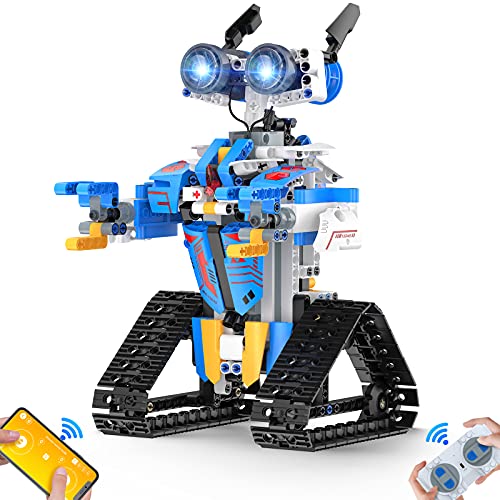
Henoda offers a robust STEM-building experience with more than 468 pieces and multiple control modes, including Bluetooth app control and 2.4GHz remote. The kit emphasizes hands-on construction, improving hand-eye coordination and practical building skills. Children can explore diverse functions—driving, rotating, and interactive modes—and then switch to programming or voice-control modes. It’s designed to keep kids engaged by combining hardware assembly with software-driven projects.
ELEGOO UNO R3 Smart Robot Car Kit V4

ELEGOO’s UNO R3 Smart Robot Car Kit V4 centers on Arduino-based robotics education. It provides a complete package with 24 modules, including obstacle avoidance and infrared remote control, supporting Android and iOS devices via smartphone control. The kit emphasizes foundational electronics and programming concepts, with an emphasis on a modular, easy-to-assemble design. It is well-suited for beginners who want a clear path from hardware assembly to software control and experimentation.
BAZOLOTA Robot Toys — Gesture Sensing Remote Control
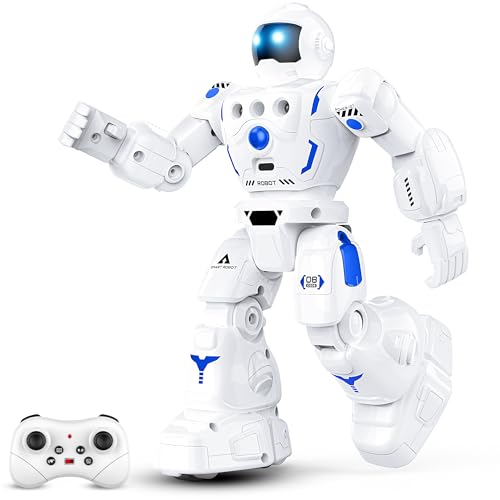
BAZOLOTA’s robot toys emphasize gesture sensing and RC control, offering engaging play that transitions into programmable actions. The robot responds to simple hand gestures for directional commands, while the remote control allows for traditional operation. Features like singing, dancing, and storytelling expand the play scenarios, and the product includes a rechargeable battery with USB charging. This option is particularly appealing for younger kids who benefit from intuitive, visual control cues and extended playtime.
Buying Guide: Key Purchase Considerations
- Age and skill alignment: Choose a kit that matches the child’s age and current coding or building experience. Early kits emphasize drag-and-drop coding and guided tutorials, while advanced options introduce Python or more complex mechanics.
- Programming path: Determine whether a Scratch-based or text-based (Arduino/Python) approach best suits the learner. Scratch builds foundational logic, while Python and Arduino expand computational thinking and hardware interaction.
- Build complexity and time: Some kits assemble in minutes and offer quick wins, while others require longer build sessions. Consider the child’s patience, attention span, and interest in hands-on projects.
- Hardware and software ecosystem: Look for kits with robust software support, online tutorials, and an active community. This helps with troubleshooting and ongoing learning.
- Hardware versatility: Kits with modular components, additional sensors, and expansion options provide longer-term value as the child’s abilities grow.
- Battery life and power sources: Check whether batteries are included or rechargeable options are available, and factor in typical playtime between charges.
- Safety and durability: Ensure parts are robust, non-toxic, and age-appropriate for the intended user. Larger robots may be more durable for younger children but require supervision during assembly.
- Future-proofing: Some kits offer upgrade paths (e.g., adding Python or AI components) that keep the kit relevant as skills advance.
The selections above represent a spectrum of programmable robots for kids, from entry-level builders to more feature-rich platforms. When choosing, balance immediate engagement with long-term learning goals to maximize educational value and continued curiosity in science, technology, engineering, and mathematics.