The toy laptop market offers a range of interactive devices that blend pretend play with early learning. This article highlights five standout options ideal for preschoolers to early elementary ages. Each pick combines engaging themes with age-appropriate activities, helping kids build alphabet, numbers, and basic computer familiarity in a playful, safe setting.
Summary of chosen products
| Product | Brand | Key Benefit | Play Modes |
|---|---|---|---|
| LeapFrog 2-in-1 LeapTop Touch, Green | LeapFrog | Versatile 2-in-1 design with keyboard and tablet mode | ABC, 1-10, role-play |
| Disney Princess Style Collection Laptop | Disney Princess | Character-themed learning with music and phrases | Five modes, 15+ phrases |
| LeapFrog 2-in-1 LeapTop Touch, Pink | LeapFrog | Similar 2-in-1 versatility in a kid-friendly pink design | ABCs, numbers, games, music, messages |
| VTech Genio Bilingual JuniorBook | VTech | Bilingual learning with English/Spanish support | 80+ activities |
| VTech Play Smart Preschool Laptop | VTech | Realistic look with multiple activities and personalization | 30 activities, leveled learning |
LeapFrog 2-in-1 LeapTop Touch, Green

The LeapFrog LeapTop Touch provides a flexible, child-friendly learning tool that grows with a child. Its screen flips to switch between a traditional keyboard layout and a touch-tablet mode, offering two ways to explore content. The keyboard emphasizes letters A-Z and numbers 1-10, with role-play features like emailing Scout, enabling pretend communication. Parents can customize to help children spell their own name, supporting early literacy and name recognition. This blend of tactile and screen-based interaction suits a range of learning styles.
Explorers can engage in five learning modes—alphabet, numbers, games, music, and messages—creating varied experiences that maintain interest. The compact, durable design is appropriate for preschoolers, and the 2-in-1 concept mirrors real-world technology, which can spark curiosity about how devices function. While it prioritizes foundational skills, the toy also encourages imaginative play through emails and role-play scenarios.
Disney Princess Style Collection Laptop

The Disney Princess Style Collection Laptop brings a character-themed learning experience with a built-in library of over 15 phrases, sounds, and music. With two double-sided desktop screens, children can access four screens corresponding to five play modes, making transitions between activities feel dynamic and engaging. The included stickers let kids customize their device, supporting personalization and creative expression. Aimed at younger learners, this option blends storytelling elements with practical early-learning content across multiple play styles.
Educational focus includes language development through phrases and music, with opportunities to practice comprehension as children connect phrases to corresponding actions. The design emphasizes friendly visuals and familiar characters to maintain engagement without overwhelming new readers. The ability to customize helps reinforce a sense of ownership over the toy and its learning journey.
LeapFrog 2-in-1 LeapTop Touch, Pink
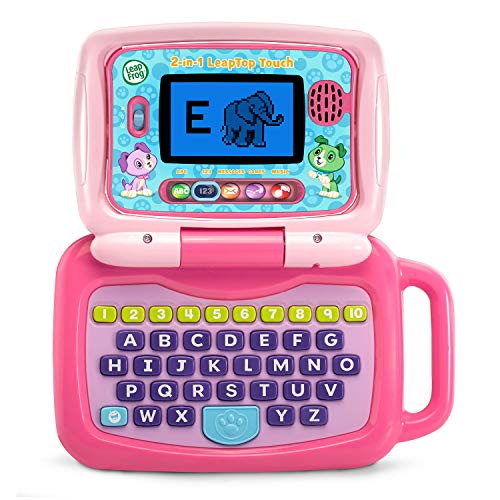
This pink variant mirrors the green LeapTop Touch in design and functionality, offering the same 2-in-1 versatility. It converts from a keyboard-based learning laptop to a touch-enabled tablet, giving children choices in how they interact with content. The five learning modes—ABCs, numbers, games, music, and messages—provide a structured progression through core early-learning topics, supporting phonics, number sense, and early math skills. The pink color option adds a playful aesthetic that may appeal to kids who favor themed gear.
By combining tactile keyboard activities with a touch-screen experience, the LeapTop Touch supports multi-modal learning. Parents can leverage the device to introduce simple digital literacy concepts, such as navigating menus and understanding how to switch modes. This balance of traditional and digital play aligns with many early education approaches that seek to merge screen time with hands-on activities.
VTech Genio Bilingual JuniorBook

The VTech Genio Bilingual JuniorBook is designed to resemble a grown-up computer while remaining kid-friendly. It features a full-size QWERTY keyboard and a cursor controller to simulate real computer use. The device offers more than 80 activities that cover math, science, language arts, music, and Spanish, with a fully bilingual setup that enables each activity to be played in English or Spanish. This makes it a strong option for families seeking bilingual exposure and diverse subject practice in a single device.
The curriculum includes apps such as a weekly calendar, notebook, and music player, providing routine-building activities alongside core academic skills. The bilingual aspect supports early language development and cultural exposure. The Genio JuniorBook tends to appeal to children who enjoy exploring varied topics and who benefit from a structured, interactive learning path that mirrors basic computer use.
VTech Play Smart Preschool Laptop

The VTech Play Smart Preschool Laptop presents a sleek, adult-like design paired with robust learning content. It features 30 activities with leveled learning, which helps adjust difficulty as a child progresses. Personalization options include naming the device and enhancing avatars, tailoring the experience to the child. The activities introduce early Spanish words, alongside foundational literacy and numeracy tasks. The combination of personalization, practical content, and a premium look makes it a compelling choice for kids ready to engage with more varied topics.
Key strengths include a broad activity set, language exposure, and a design that resembles real-world devices, helping children build comfort with technology while focusing on foundational skills. The personalization options also support identity development and ownership over the learning process. For families wanting a more extended, feature-rich preschool laptop, this option provides a substantial repertoire of activities and an approachable interface.
Buying Guide: What to Consider When Selecting a Toy Laptop For Kids
- Age appropriateness: Check the recommended age range and the complexity of activities to ensure alignment with a child’s current skills and future learning trajectory.
- Learning focus: Decide whether you want literacy, math, bilingual exposure, or a broad mix of subjects. Some models emphasize phonics and numbers, while others include music and games.
- Interaction style: Consider whether your child benefits more from keyboard-based play, touch-screen experiences, or a blended 2-in-1 design that can switch modes.
- Durability and safety: Look for sturdy construction, rounded edges, and non-toxic materials. A protective screen layer or rugged casing is a plus for younger users.
- Personalization options: Devices that allow naming, avatars, or custom settings help foster ownership and continued engagement.
- Language features: If bilingual exposure matters, prioritize devices with English/Spanish options or other language support.
- Content variety and progression: Favor models with multiple modes and leveled activities to maintain interest as skills grow.
- Screen time balance: Consider devices that encourage offline interaction and role-play alongside screen-based tasks to promote a healthy balance.
Choosing the right toy laptop involves weighing the child’s interests, learning goals, and how they engage with technology. The options listed here offer a spectrum from simple role-play to more structured educational experiences, helping families select a device that complements everyday learning routines. While prices and availability change, the core features—interactivity, personalization, and age-appropriate content—remain central to effective early learning with these tools.